How Product Tags Boost Your SEO on Uzanga
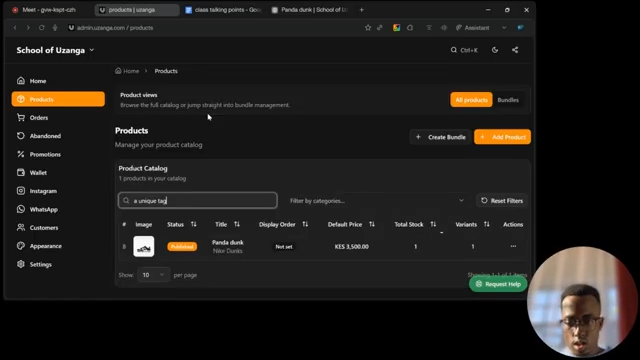
Product tags help improve your website search by connecting products to keywords customers are likely to use. To add tags, open a product, expand the More Info section, and go to Tags. Add relevant keywords related to the product, then save your changes. You can also test search functionality by adding a unique tag and searching for it afterward. Using effective tags makes products easier to discover and improves the overall shopping experience for customers.
How Product Tags Boost Your SEO on Uzanga
Step 1: Open the Product
Go to your product list and select the product you want to edi

Step 2: Open More Info
Scroll down to the More Info section and expand it.

Step 3: Find the Tags Section
Locate the Tags field.
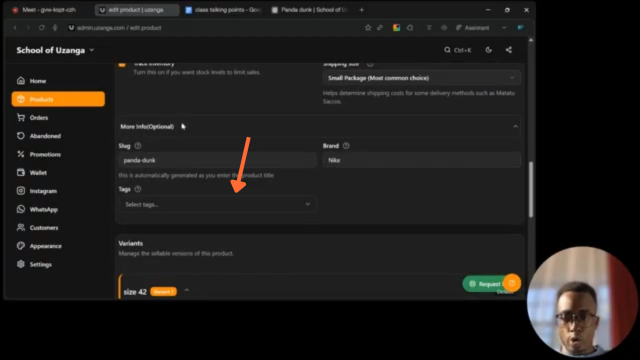
Step 4: Add Relevant Tags
Enter keywords related to the product. You can add multiple tags such as:
- Nike
- Panda Dunks
- Nike Shoes
- Sneakers
Think about the words customers are most likely to search for.

Step 5: Add a Unique Test Tag
To test how tags work, add a unique keyword that is only attached to this product.

Step 6: Save the Product
Save your changes to apply the new tags.

Step 7: Test the Search
Use the website search bar and type the unique tag you added.
Why This Is Important
Product tags help your website become easier to discover both through your website search and through search engines like Google 🔎
When someone searches for terms like:
Nike Shoes Panda Dunks Black Sneakers
your tagged products have a better chance of appearing in the results.
Tags also improve the shopping experience on your website because customers can quickly find related products using search.
Think of tags as little signposts attached to your products, helping both customers and search engines understand what you’re selling.
The more accurately you tag your products, the easier they become to discover.